Sunday, September 16, 2012

Dotty Tags ~ Free Printable

A free printable for you!

Last year I made "Days of the Week" tags with a variety of cute backgrounds.  I have been meaning ever since to create just a set of dots and chevrons.  So, here's the first of 2 new printables coming up!


The free download is in my TPT store and it's a zip folder containing a PDF and a JPEG of the full size 8.5x11 sheet of labels/tags.  Feel free to add your own text in a graphics program such as Paint.Net or Photoshop, or just print out and write on/use letter stickers.

I should have the chevron version finished and uploaded to TPT this week too, but I'll do another post and let you know for sure.

Let me know if you'd prefer a Scribd link in the comments below.  Have a great day!

5-Day Lesson Plan Template ~ Free

Last year I created a 5-day Lesson Plan template for my TPT store, that included "spaces" to plan for my entire day.  I teach on a 4x4 block schedule with a split lunch and an "Encore" (study hall) period, so I used a version slightly different than the one I posted on TPT (and here) but it was still mostly the same.

I discovered, though,  that by condensing my weekly lesson plan for each class (I teach 3 preps each "block" with one planning period) I was losing some much needed space for "reminders" and for those activities that were new or unfamiliar to me.  As such, I was working out of TWO lesson plans a lot of the time; the 2-page spread that I created for my "lesson planning binder" and an individual "class lesson plan" for those activity-filled days.

Frankly, I was losing my marbles trying to remember where I typed/put/found information!  So it was back to the drawing board for me!  This is the template I'm trying out THIS year.  It's still a 2-page spread, 5-day lesson plan (week at a glance almost), with all of the items my district requires plus a few extras that I like to have on hand. (Like birthdays).


I still went for a colorful mix, because I like bright, cheery colors.  The font used is "Jester" and is freely available on Urban Fonts and Dafont, last I checked.  The owl clip art is from Pink Pueblo, who has adorable cliparts and Photoshop brushes in her Etsy shop.

This lesson plan format is probably most suitable for someone like me, who teaches multiple classes per day and needs a bit more detailed plan for the week. 

The margins are suitable for hole punching in the center so that the plan lies flat in a binder!  Woot! That's my favorite part. :)

If you need a new LP template, check it out!  It's fully customizable, in a docx format and is a free download in my Teachers Pay Teachers store.

Let me know if you need a Scribd link, I can add it there as well!

Hope you're having a great year!

Sunday, August 26, 2012

Hello again!

Hello there, everyone!  I am at the start of a new school year, and I'm hopeful that I can get my act together and restart blogging here once more.  I had lots of plans and things to share last year, and I just let time and busy work get the best of me. 

I've been getting emails from people regularly over the past few months about my lesson plan templates and my creative syllabus posts.  Thank you ALL for being so supportive and kind! 

I'll be back in a few days with an updated classroom tour (I moved AGAIN this year into a new space) and I have some printables to share too. 

See you soon!

Monday, January 23, 2012

Quick Update!

Whew, the 2nd half of the semester really ate into my free time.  I needed Christmas break to recharge!

I'm reworking my graphic design curriculum this semester and I'm going to start sharing some fun lessons and activities in the next few weeks.  I haven't forgotten about my little blog!  Just sidetracked by life...

Hope the school year is going well for everyone. :)

Saturday, October 15, 2011

the Creative Syllabus

My school requires a syllabus for every class, every term.  Since I teach on block, and usually have 3 different "preps" (classes) per block, that means upwards of 12 syllabi each year!  (Not really, I repeat 3 or 4 classes once!)

I've been doing a "creative syllabus" for a couple of years now.  I started doing this because otherwise they're BORING to read aloud to them, and they almost never read along, AND I would find them left behind after the first day on desks and tables.  Grrr. 

So... enter the Comic Strip Syllabus:

This syllabus was created using the Marvel Superhero Comic site.  They have an awesome comic creator!  I love that you can download and save or print your finished comic strip or comic book (yes, you can write an entire storyline with multiple pages and layouts!)  This syllabus is for my Imaging (graphic arts) class.  I'm fairly confident they're going to love it!

For my Fashion class, I created their syllabus using MagCover.com


This site is also free and you can download your finished cover (many, many different themed covers already set up to edit with your own images and text!)  I did pay the $1.99 fee to download a high quality version though, since I loved it so much.  I might even print and frame or laminate it for my classroom walls. 

The illustration on my Fashion cover is from a Deviantart artist Bree Leman.  This print was free to download from her DV site, but she has some lovely artwork for purchase too (higher quality/resolution prints).

One thing you might note is how concise the information is.  Due to the format of a comic or magazine cover, you have to be short and to the point.  At first I was worried I wasn't "covering everything".  Then I discovered...I was too wordy before.  The kids stop listening after a while, and besides what do I REALLY WANT THEM TO KNOW??

That's what I concentrate on for the info on my creative syllabi.  The really important goods.  The rest is fluff and unnecessary (and can be replaced with cool graphics and fun comic book SPLATS!)

I hope this might inspire some of you to try a new format for your boring old syllabi! 

Sunday, October 9, 2011

Days of the Week: Free Printable

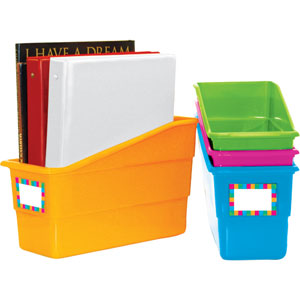
I just bought these super fun book & binder bins from Really Good Stuff to organize my weekly lessons.  I really like the set of 5 from Lakeshore Learning, but feel like the primary colors are too juvenile for my high school classroom.  I bought the neon colors pictured below and the "earth" colors too.  Bonus: I have 3 extra tubs for other things! 
The weird thing is that they don't offer a set of 5 with a rack (like the Lakeshore Learning set).  It's a set of FOUR with a rack.  I bought the set without the rack, and I think it will be fine.  I'm not planning on storing binders or large items in them, just my copies and file folders, so they shouldn't tip over.  I have a place on the corner of my desk (against a wall) which will help sturdy them up too.

BUT...I need to label them.  Because I like labeling things!  So I made these:


Aren't they cute??  They are 2.5 x 3 inches each and should fit perfectly in the label/tag section on the front of the bin (with a bit extra for trimming if needed).  I made all of the background patterns in Photoshop and used a fun font from Kevin & Amanda's scrapbook fonts.  Should jazz up my desk nicely!

You can download your 1-page PDF freebie from my TPT store here!

Saturday, October 8, 2011

Free Printable: Giant Wall Calendar

I have long wanted one of these!  Pottery Barn had a cool one for your office a few years ago, and many Etsy sellers have taken this idea and ran with it. 

I had some free time on my hands (and a blank spot behind my desk at school) so I made my own!


It's HUGE!  A full 24 x 36 inches, standard poster size.  I'm going to make a Hobby Lobby run in the next couple of days to pick up a pretty white frame for it (and some 3M removable hooks too). 

It's a perpetual calendar, with a blank to write in the month and nice big squares to write in all of your to-do's in each day.  You can use Expo or dry erase markers right on the glass from the frame. 

My name is only in the preview...that cute little tag (from the Coffeeshop Blog!) is blank on the actual printable I uploaded to my Teachers Pay Teachers store.  Feel free to open it in Photoshop or your graphics program and add your name if you like!

You can download your own Giant Perpetual Wall Calendar in my TPT store!

I think I'll use Walgreen's to print my poster, or maybe Vistaprint (which is a little cheaper). 

I took a picture of my Graphic Design student's Optical Illusion artwork from the Line Project I posted last month.  They turned out really awesome!  I'll have to download the photo from my ipod and share that in the next few days.  I have several other things I've been wanting to share and have just been too busy.  Can you believe how fast September flew by??

Have a great weekend!